

On this page
- What is a recruitment software integrations checklist?
- Why do recruitment software integrations matter for staffing agencies?
- What should be on your recruitment software integrations checklist?
- Which integrations does Hirin support today?
- How do you test integrations during a vendor demo?
- What are the red flags in a recruitment software integration?
- Matching your integration priorities to your hiring situation
- Recruitment software integrations: what do buyers ask most?
- How we researched this
Key takeaways
- A recruitment software integrations checklist covers ten categories: calendar sync, candidate messaging, video interviews, assessments, ATS connectivity, HRMS/payroll handoff, background verification, e-signature, reporting and security, and admin controls.
- Two way calendar sync helps prevent double booked interview slots when many interviews run in parallel.
- Hirin.ai connects with Google Calendar and Outlook Calendar for scheduling, WhatsApp and email for candidate communication, Google Meet and Microsoft Teams for video interviews, Concept Ninjas for technical assessments, and generic ATS systems to keep candidate data joined up.
- Agencies should confirm whether a vendor offers true two-way data sync or only a one-way export, since the difference changes daily workflow significantly.
- Hirin.ai does not currently offer HRMS/payroll handoff, background verification, or e-signature integrations, and agencies needing those should confirm fit directly on a demo call.
What is a recruitment software integrations checklist?
A recruitment software integrations checklist is a structured list of the systems a hiring platform must connect with, such as calendars, messaging apps, video tools, assessment providers, and the agency's existing ATS, before a buyer signs a contract. It exists so agencies can compare vendors on functional fit rather than feature marketing. Each item on the checklist names the system, why the connection matters operationally, and the exact question to put to the vendor.Why do recruitment software integrations matter for staffing agencies?
Recruitment software integrations matter because staffing agencies run parallel hiring loops across multiple clients, and any manual step between tools multiplies across every candidate and every mandate. A recruiter juggling five client accounts cannot afford to re-key a candidate's assessment score from one portal into another, or to manually build a Google Meet link for every interview. Consider a typical high-volume desk filling 40 warehouse roles a month for one client. If interview scheduling requires switching between an ATS, a personal calendar, and a separate messaging app, the recruiter loses time to coordination rather than candidate evaluation. That gap shows up as slower time-to-hire, more interview no-shows from delayed confirmations, and client mandates that slip past deadline. Integrations also affect data integrity. When a tool only exports data one way, candidate status in the ATS can drift out of sync with what actually happened in an interview, creating reporting errors that surface during a client review call.What should be on your recruitment software integrations checklist?
A complete recruitment software integrations checklist for 2026 covers ten categories: calendar sync, candidate messaging, video interviewing, technical assessments, ATS connectivity, HRMS and payroll handoff, background verification, e-signature, reporting and security, and admin controls with data residency. Each category needs a specific verification question, not a generic "does it integrate" ask.Calendar integrations (Google Calendar, Microsoft Teams)
Verify whether the vendor offers two-way calendar sync, meaning a change made in either system reflects instantly in the other, rather than a one-way export that still needs manual confirmation. This matters because agencies running multiple interview loops per day cannot afford double-booked slots caused by stale calendar data. Ask the vendor: "If I reschedule from my own calendar app, does the candidate's confirmed slot update automatically inside your platform?"
Candidate communication channels (WhatsApp, email)
Check whether candidate messaging happens inside the recruitment tool itself, through WhatsApp and email, or whether recruiters must switch to a separate app to reach candidates. If you hire for entry level or blue collar roles in India, test WhatsApp and email side by side during the trial and compare how quickly candidates reply on each. Ask: "Can a recruiter see the full WhatsApp and email thread with a candidate inside one profile, without opening a separate app?"
Video interviewing and conferencing
Confirm whether interview links generate and share automatically once a slot is confirmed, using platforms like Google Meet or Microsoft Teams, instead of a recruiter manually creating and re-sending a link for every interview. This removes a repetitive task that adds up fast across back-to-back interviews on multiple client accounts. Ask: "Is the video link generated and sent to both the candidate and interviewer the moment a slot is confirmed?"
Technical and skill assessments
Check whether assessment invites go out automatically after screening and whether scores land directly in the candidate's profile, through a provider like Concept Ninjas or a similar third party, instead of requiring a recruiter to check a separate portal and re-attach reports. This matters most for technical hiring, where assessment turnaround speed directly affects time-to-hire. Ask: "Does the assessment score sync automatically into the candidate record, or do we need to download and upload it manually?"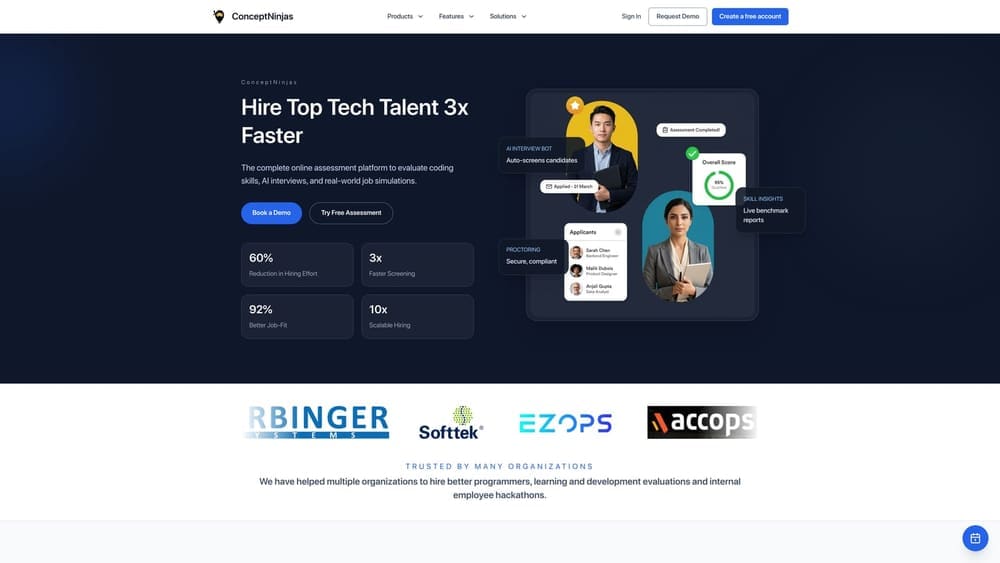
ATS integration and data sync direction
Verify whether the tool works alongside your existing ATS, keeping candidate and job order data in sync, or whether adoption forces a full migration of historical records. Also confirm the direction of sync, since some vendors only support one-way export rather than live two-way updates. Ask: "If a candidate's status changes in your platform, does that reflect back in our existing ATS automatically, or do we need to update both systems separately?"HRMS and payroll handoff
Check whether accepted candidate data, such as offer details and joining information, exports in a format usable by your HRMS or payroll system, closing the gap between "candidate hired" and "candidate onboarded." Not every recruitment tool covers this step, so check whether yours hands data to your HRMS or leaves it to a separate vendor. Ask: "What format does offer data export in, and has it been tested with our specific HRMS?"Background verification triggers
Confirm whether an offer acceptance can automatically trigger a background verification request with your existing verification partner, rather than requiring a recruiter to manually initiate the check. This matters for compliance-heavy client mandates where verification turnaround is part of the SLA. Ask: "Can offer acceptance trigger a verification request with our current verification vendor automatically?"E-signature for offer letters
Check whether offer letters and compliance documents route through an e-signature tool directly from the platform, or whether recruiters need to download, send, and track signatures manually outside the system. This affects how quickly an offer moves from acceptance to a signed, compliant document. Ask: "Does the platform route offer letters through our e-signature provider, and can we track signature status inside the tool?"Reporting and security controls
Verify whether the platform offers role-based access by team, client, or job order, along with an audit trail of scheduling, messaging, and status changes. This directly affects whether a multi-client staffing agency can run several mandates through one platform without data crossover between clients. Ask: "Can we restrict a recruiter's visibility to only their assigned client accounts and job orders?"Admin controls, support, and data residency
Confirm where candidate data is stored, who owns the account-level admin settings, and what support model the vendor offers once the contract is signed. Data residency terms matter for agencies handling client data under contractual confidentiality clauses. Ask: "Where is our candidate data stored, and who do we contact for support after go-live?" Here is how these categories compare at a glance, including where Hirin.ai stands today against each one:- Calendar sync: prevents double-booked interviews; ask about two-way sync direction; Hirin covers this today through Google Calendar and Outlook Calendar.
- Candidate messaging: speeds up first-round contact; ask if WhatsApp and email live inside one profile; Hirin covers this today through WhatsApp and email inside the platform.
- Video interviewing: removes manual link creation; ask if links generate automatically; Hirin covers this today through Google Meet and Microsoft Teams.
- Technical assessments: speeds up technical hiring turnaround; ask if scores sync automatically; Hirin covers this today through Concept Ninjas.
- ATS integration: avoids a disruptive migration; ask about sync direction; Hirin covers this partly, through generic ATS connectivity without a named product commitment.
- HRMS/payroll handoff: closes the hire-to-onboard gap; ask about export format; not offered by Hirin today.
- Background verification: speeds up compliance turnaround; ask about automatic triggers; not offered by Hirin today.
- E-signature: speeds up offer-to-signature time; ask about routing and tracking; not offered by Hirin today.
- Reporting and security: protects multi-client data separation; ask about role-based access; confirm current scope directly with the Hirin team on a demo call.
- Admin controls and data residency: affects compliance posture; ask where data is stored; confirm current scope directly with the Hirin team on a demo call.
Which integrations does Hirin support today?
Hirin.ai is AI-powered recruitment software built for staffing and recruitment agencies, automating screening conversations on WhatsApp and by AI voice call , interview scheduling and high-volume hiring workflows within a connected tech stack. It is built for agencies that want fewer tools open at once during a busy hiring day, not a platform meant to replace every system in the stack.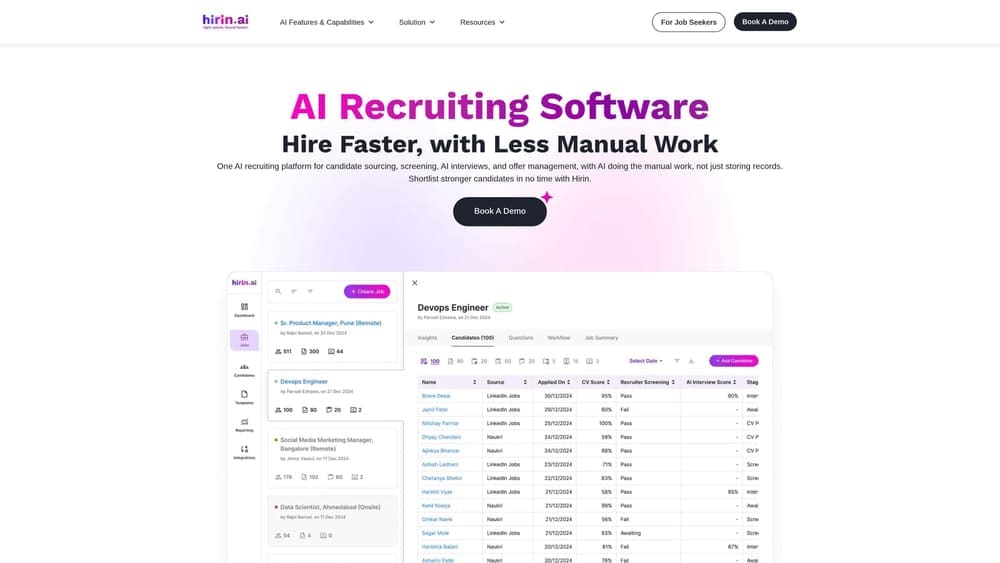
- Two-way calendar sync with Google Calendar and Outlook Calendar keeps interview scheduling aligned with the calendars recruiters and hiring managers already use.
- WhatsApp and email messaging from inside the platform keeps candidate screening and engagement in one thread instead of a separate app.
- Automatic Google Meet and Microsoft Teams link generation attaches a working video link to every confirmed interview slot without manual copy-paste.
- Concept Ninjas assessment scores sync directly into the candidate profile, so recruiters see technical and skill results without checking a separate portal.
- Generic ATS connectivity keeps hiring data joined up with the agency's existing ATS rather than forcing a rip-and-replace migration.
How do you test integrations during a vendor demo?
Test integrations during a vendor demo by asking the vendor to perform the action live, not describe it. Ask them to reschedule a mock interview from your own calendar app and show the change reflecting inside their platform in real time. Ask them to send a WhatsApp message to a test candidate number and show where that conversation history lives inside a candidate profile. For assessments, ask the vendor to trigger a test assessment invite and show you where the score appears once submitted, rather than describing the workflow verbally. For ATS connectivity, ask specifically whether the demo environment reflects your ATS or a generic sandbox, since sandbox demos can hide sync gaps that appear only with your real data structure. Bring a real scenario from your own desk: a client mandate with a tight deadline, a candidate who needs rescheduling twice, an assessment result that needs to reach a hiring manager same day. Vendors who can walk that scenario through their actual product, live, are showing you something more reliable than a slide deck.What are the red flags in a recruitment software integration?
The clearest red flag is a vendor who describes an integration only in general terms, such as "we integrate with your calendar," without naming the specific platform or showing the sync direction. Vague language usually means a one-way export dressed up as an integration. Other red flags worth watching for:- A vendor who cannot answer whether sync is one-way or two-way when asked directly.
- A demo that only shows a sandbox environment and avoids connecting to your actual calendar, WhatsApp number, or ATS during the call.
- Integration claims that require a paid add-on or a separate implementation project not disclosed until after signing.
- No clear answer on where candidate data is stored or who has access once your team starts using the platform.
- Reluctance to state plainly which categories on your checklist they do not cover yet.
Matching your integration priorities to your hiring situation
A high-volume hiring desk filling dozens of roles a month should weight calendar sync, WhatsApp messaging, and automated video links the heaviest, since those are the categories where manual coordination eats the most recruiter time. Hirin.ai's coverage of Google Calendar, Microsoft Teams, WhatsApp, email, and Google Meet fits that specific need directly. A staffing agency serving multiple clients at once should prioritize reporting, role-based access, and data separation between accounts, alongside confirming exactly what a vendor does not cover so client-specific compliance requirements are not assumed away. Ask direct questions about admin controls before signing anything. An agency not ready to replace its existing ATS should push hardest on the ATS integration category, confirming sync direction and whether historical data needs to migrate at all. Hirin.ai's approach of connecting with existing ATS systems, rather than forcing a switch, is built for exactly that situation.Recruitment software integrations: what do buyers ask most?
Does recruitment software integrate with Google Calendar?
Many recruitment platforms integrate with Google Calendar for scheduling, though the sync direction varies by vendor. Hirin.ai offers two-way sync with Google Calendar and Outlook Calendar, so interview slot changes update automatically on both sides without manual confirmation.
Can I message candidates on WhatsApp from recruitment software?
Some recruitment platforms support WhatsApp messaging directly inside the tool. Hirin.ai runs WhatsApp and email candidate communication inside the platform, keeping the full conversation history in the candidate profile instead of a separate messaging app.
Do I need to replace my ATS to use AI recruitment software?
Not always: some AI recruitment tools are built to sit alongside an existing ATS, while others are full ATS platforms meant to replace it. Hirin.ai connects with existing ATS systems to keep hiring data joined up, without requiring migration of historical candidate records.
How long does it take to set up recruitment software integrations?
Setup time depends on the vendor and the depth of integration required, ranging from a few clicks to weeks for complex HRMS handoffs. Hirin.ai's calendar, messaging, video, and assessment integrations are designed to be configured in minutes rather than a formal migration project.
Can I use my own skill assessments in recruitment software?
It depends on which assessment provider the recruitment platform supports natively. Hirin.ai syncs technical and skill assessment scores through Concept Ninjas directly into candidate profiles, and agencies using a different provider should confirm compatibility on a demo call.
Does recruitment software handle background verification?
Some recruitment platforms integrate with background verification vendors to trigger checks automatically on offer acceptance. Hirin.ai does not currently offer background verification integration, and agencies needing this should confirm the requirement directly with the vendor's team.
Can recruitment software generate video interview links automatically?
Yes, many platforms generate video links automatically once an interview slot is confirmed. Hirin.ai automatically creates and shares Google Meet and Microsoft Teams links for scheduled interviews, removing the manual step of building and re-sending links.
What is the difference between one-way and two-way integration sync?
One-way sync means data flows in a single direction, such as exporting calendar events without reflecting changes made elsewhere. Two-way sync updates both systems automatically in either direction, which is why buyers should always ask vendors to clarify sync direction before signing.
How we researched this
This is a buyer’s checklist, not a research piece, so it has no statistics of its own. We checked the third party products and Indian laws it refers to against official vendor documentation and government sources on 1 November 2026. Claims about Hirin.ai’s own integrations are not sourced here.
- Google, Add or remove a video conference from your Calendar event (Google Calendar Help) Google Meet links can be added to Calendar events automatically (checked 1 November 2026).
- Microsoft, Create onlineMeeting (Microsoft Graph v1.0) how software creates Teams meeting links programmatically (checked 1 November 2026).
- Meta, WhatsApp for Business (Business Platform and Business App) business.whatsapp.com now redirects here (checked 1 November 2026).
- ConceptNinjas, Online Technical Assessment Platform & AI Coding Tests technical assessment provider named in the post (checked 1 November 2026).
- Ministry of Electronics and IT, Government of India, The Digital Personal Data Protection Act, 2023 (No. 22 of 2023) Section 16 lets the government restrict transfer of personal data outside India; relevant to the data residency question (checked 1 November 2026).
- Controller of Certifying Authorities, Government of India, The Information Technology Act, 2000 (Gazette text) legal basis for signing records electronically; original 2000 text, later amended to cover electronic signatures (checked 1 November 2026).

Vikas Agarwal
Founder, Hirin.ai
Vikas Agarwal is the founder of Hirin.ai, an AI recruitment platform that screens, interviews and shortlists candidates for Indian hiring teams and staffing agencies. He has spent years building digital products and now works on the hiring problems recruiters raise every day. He writes about AI in recruitment, staffing and the future of work.